Built for your own media collection
Mediagg plays the media you own, the podcasts you follow and the content on the servers you run. No subscription is required.
Local media
Music, video and files on your device, organised into separate views.
- Songs — sort by name, date added or length
- Albums, artists, genres and years, built from your file tags
- Videos — full-screen video player
- Filesystem — file browser with support for multiple storage volumes
Playlists
Create playlists in the app or import existing ones.
- Create, rename, pin and add cover images
- Import M3U playlists from device storage
- Add items to a playlist from any screen
- Play or shuffle any list
Podcasts
A complete podcast player with subscriptions, downloads and sync.
- Subscriptions, queue, inbox and downloads
- Chapters and transcripts that follow playback
- Automatic downloads that free up space as needed
- OPML import and sync with gpodder.net or Nextcloud
Video
Play films and shows from your device and your media servers.
- Local video playback
- Films and shows from Jellyfin, Plex and Emby
- Continue watching resumes where you left off
- Cast to your TV
Playback controls
Control how your media plays.
- Variable playback speed and sleep timer
- Synchronised lyrics from your files or LrcLib
- Queue with drag-to-reorder, search and sorting
- Lock-screen and notification controls
Customisation
Adjust the layout to suit how you use the app.
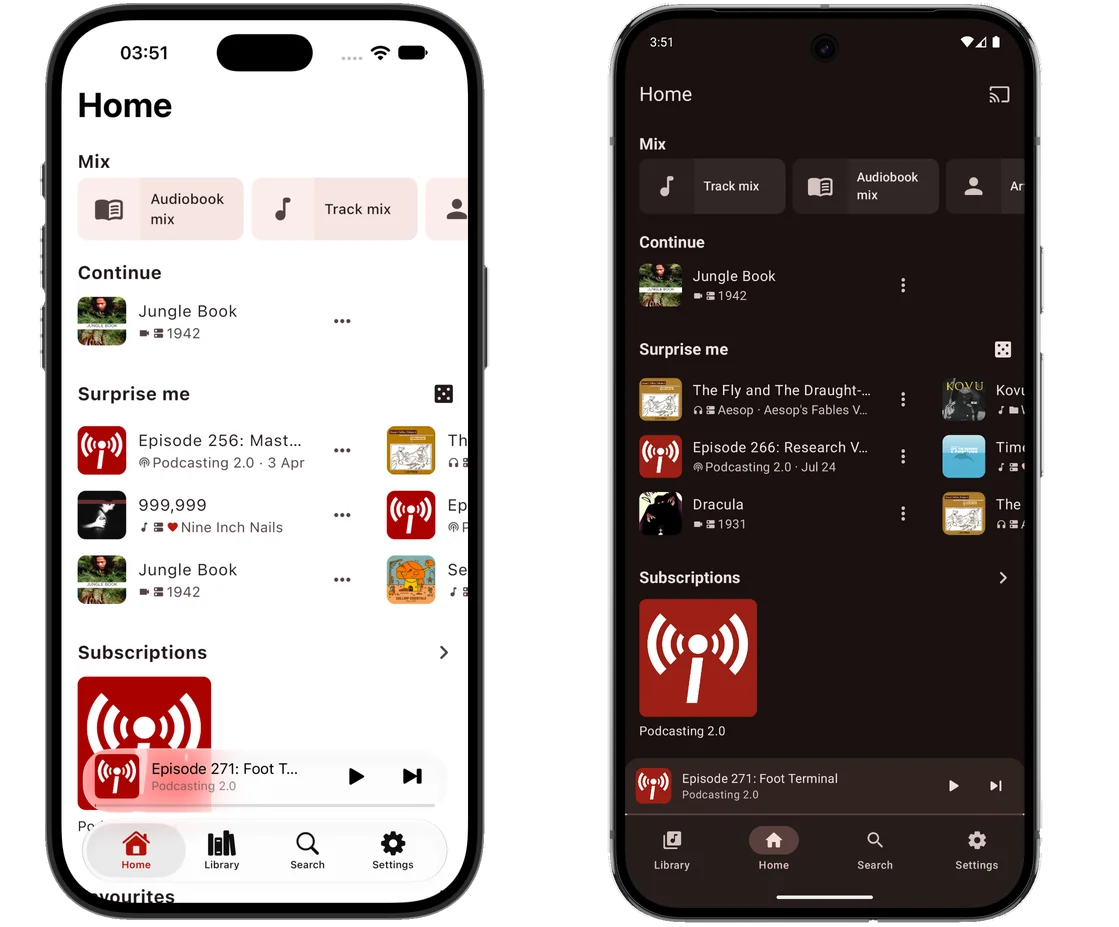
- Reorder the home-screen sections
- Choose the tabs in the bottom bar
- Grid or list view, saved per screen
- Light, dark and true-black themes, with colours taken from the artwork
Light and dark themes
Each screen is shown in both the light and the dark theme. Use the arrows or swipe to browse, and select a screenshot to view it at full size.
Connect your media server
Sign in to your media server to browse its albums, artists, playlists, films, shows and audiobooks, with artwork, search and offline downloads. You can connect several servers at the same time.
Cached browsing
Mediagg stores server responses on your device. Screens you have visited before open immediately from the cache and update when the server responds. If the connection drops, your library remains available to browse.
Screens load from the cache and update when the server responds.
No server yet? Make one in three questions
Mediagg Arr Stack turns a Mac, a Raspberry Pi or any Linux computer into a home media server. One command installs what you choose — Jellyfin, Emby or Plex, Navidrome for music, Audiobookshelf for audiobooks, and the services that find and fetch more — sets each one up and connects them to each other. Everyone in the house gets a login of their own, and one six-digit code hands the lot to Mediagg on each phone and TV.
Paste it into a terminal — on the computer itself, or over SSH. Free and open source, runs in Docker, removable in one go. Windows to follow.
- 1Run one commandChoose a folder for your films. Docker is added if it is missing.
- 2Answer three questionsWhere you watch and listen, what fetches more — and a login for everyone in the house.
- 3Press InstallEach service is set up and connected for you, with a real progress bar.
- 4Type one code in MediaggOr scan it. Every server is added at once, signed in as that person, and follows the computer if its address changes.
Chromecast and DLNA casting
Cast to Chromecast devices and to DLNA/UPnP renderers on your network, including smart TVs, AV receivers and networked speakers. While casting, Mediagg runs a built-in media relay, so files on your device can be played as well as streams from your servers.
Search across all your sources
A single search covers your device, your podcast subscriptions and every connected server. Switch to Discover to search podcast directories instead.
Unified search
Search local files, podcasts and all connected servers at once, with results grouped by source.
Top podcasts
Browse the Apple Podcasts charts by country and category, starting with your region. Directory search also includes PodcastIndex.
Synced favourites
Starring a track in Mediagg also stars it on your server.
Listening statistics
View your listening history by show, with monthly charts.
Playlist subscriptions
Subscribe to station and channel playlists from a public GitHub directory or an m3ugoat server. Subscribed playlists are refreshed to stay up to date.
Mixes
Track, artist, album, film and show mixes generated by your server, plus a Surprise me section on Home with a random selection from your library.
Coming soon
Mediagg will be available on Google Play soon. A download link will be added here when it is released.
 AndroidGoogle Play · coming soon
iOSTo follow
AndroidGoogle Play · coming soon
iOSTo follow
Android is the first release. An iOS version will follow; it does not yet have a release date.